

Trying to apply for a job at Accenture and getting the “Application Already Exists” error? It’s annoying, especially when you’re ready with a new application. What this message really means is that Accenture’s system already knows about you it has your details from either another application or an existing profile. Still, seeing this doesn’t mean you’ve been rejected.
If you hit this problem, don’t rush to make a new account or start deleting things before you know what you’re doing. In this guide, I’ll break down what this error means, how to check your current application, and how to use Accenture’s Candidate Data Rights platform to manage your info if you need to.
What Is the Accenture “Application Already Exists” Error?
When you click a job link and start to apply at Accenture, the system might pop up a message:
Application already exists!
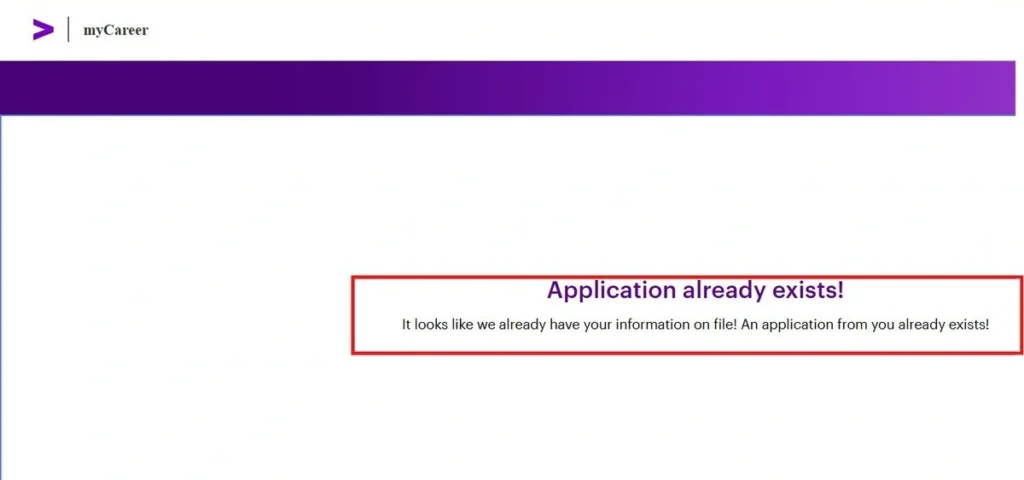
This suggests you already have a profile or an open application in their system. If you’re convinced you haven’t applied or you’re trying for a different position, it’s easy to get confused. You might have applied in the past, have something still pending, or maybe you simply forgot.
Remember, this message doesn’t mean you’ve been rejected, nor does it explain your status. Always check your profile before deciding your next move.
Why Does the Accenture “Application Already Exists” Error Happen?
Here’s why you might be seeing this message:
1. You Applied to Accenture in the Past
If you once applied, your info is still in their system.
2. You Have an Active Accenture Application
According to Accenture’s careers page, candidates applying in India can only have one active application at a time. If you’re already in the system, you have to wait.
3. You’re Using an Old Recruitment Link
You might be applying through an old link or trying for a job you’ve already submitted an application for.
4. You Forgot Your Accenture Login Information
Maybe you’re trying to re-register because you can’t get into your old account. Before making a fresh one, try to recover your username or password.
5. You Don’t Know Your Current Accenture Application Status
Maybe you didn’t get any real update after your last application. First, check what’s going on rather than assuming you’re rejected.
How to Fix the Accenture “Application Already Exists” Error
Let’s go through it step by step so you can figure out exactly what to do.
Step 1 — Check Your Accenture Application Status
Go to Accenture’s careers website:
Accenture Careers – Search Jobs
Sign in with your previous account, if you have one. Review your history and any emails Accenture sent you about applications anything still processing or recently submitted.
Forgot your login? Accenture’s Recruitment Process and FAQs will walk you through recovering your username or re-setting your password.
Tip: Always use your existing account. Making a new one rarely fixes this kind of conflict.
Step 2 — Understand Accenture’s Candidate Data Rights Platform
If you need to see, fix, or remove your personal data, Accenture has a Candidate Data Rights form.
Open Accenture’s Candidate Data Rights Form
Through this form, you can:
- Remove yourself from all recruitment databases
- Edit your info across their databases
- Ask what info they have on you
Pick whatever fits your real need. If some of your candidate info is wrong, select edit. If you need to know what they have, pick share. If you truly want out, go for removal but read the next note first.
Step 3 — Fill Out the Accenture Candidate Data Rights Form
Open the form and follow the basics:
- Choose the right request
- Enter your first and last name
- Give the email tied to your profile
- Put down the relevant company info
- Select your country (e.g., India)
- Check the consent box and do the verification
- Submit
Save a copy of your confirmation just in case you need it later.
Important for candidates in India: Accenture is clear candidates in India can have only one active application at a time. Deleting your data doesn’t get around this rule. A data rights request lets you manage your personal data, but it won’t reset your applications.
Step 4 — Contact Your Accenture Recruiter
Still getting stuck? Contact the recruiter who’s handling your application, or whoever sent you that job link. Say you’re seeing the “Application Already Exists” error and ask them to check:
- Is your application active?
- Is there some issue with your profile?
- What do you need to do next?
If you came through campus placement or an employee referral, you can ask the coordinator or the referring employee. When you reach out, include the job ID, your account’s email, and a screenshot of the error (if needed). Don’t over-share your personal info.
Step 5 — Reapply for Accenture Jobs After Clarifying Your Status
Once you know what’s going on with your old application, follow Accenture’s instructions. Their Recruitment Process and FAQs say you can reapply if you weren’t selected (use the same username and password), and that each position is a separate application.
Remember, the “one active application” rule for India still stands. Always check your situation before applying again.
Things to Know Before Deleting Your Accenture Candidate Data
A lot of people try to fix this error by deleting their profile on the spot. Think twice before you do that:
- Data deletion isn’t a shortcut. Even Accenture says erasing your data won’t beat the one-application rule in India.
- Check your application first. You might just need a status update—not a wipe-out.
- Always use the official form. Don’t trust third-party sites promising to remove your application.
- Don’t create unnecessary new accounts. Your old login is your best move.
- Processing can take time. There’s no guaranteed timeline for Data Rights requests to wait for official updates.
Frequently Asked Questions About the Accenture Application Error
Q1. Does “Application Already Exists” Mean Accenture Rejected Me?
No. It just means the system found a profile or application with your info. Check your application status or ask for recruitment support.
Q2. Does Deleting My Data Through the Candidate Data Rights Form Fix the Error?
Not always. The form is for privacy, and deleting your data won’t beat the one-application rule for India.
Q3. Can I Make a New Accenture Account With a Different Email?
That’s not a solid fix. Try recovering your old login first. Contact Accenture recruitment for help with your profile.
Q4. What Option Should I Pick in the Accenture Candidate Data Rights Form?
You can remove, edit, or ask for your data. Only ask for removal if it’s really what you want. Don’t pick it just to reset your application.
Q5. I’ve Never Applied to Accenture. Why Am I Seeing This Error?
The message can’t explain; check if you ever had a profile or application, use the right login, and if you still can’t find anything, contact support.
Q6. Can I Reapply for an Accenture Job After Rejection?
Yes, you can reapply for new roles. But in India, you need to stick to the one-active-application rule.
Q7. How Fast Is Accenture With Data Rights Requests?
There’s no exact timeline. Watch for a confirmation and follow their follow-up steps don’t count on any specific number of business days.
Quick Summary
Most of the time, the “Application Already Exists” error means there’s a previous application or profile you need to deal with. It’s not proof of rejection.
The best move: sign in to your old account, check your application, and if you’re still stuck, reach out to recruitment. Only use Accenture’s official Candidate Data Rights platform when you want to exercise your privacy rights.
If you’re applying from India, remember that deleting your profile won’t override the one-active-application rule. Figure out your status first, then decide what to do next. If you’re still looking for opportunities at Accenture, check out the latest Accenture AI/ML Computational Science Associate recruitment 2026 and review the eligibility criteria before applying.
For more company recruitment updates, fresher jobs, and off-campus drives, visit CampusToDrive to explore the latest job opportunities in India.